How to post to this website
This is information for our appointed State Co-ordinators. If you’re a Hatter wanting your event listed, you will need to send the info to your state’s Co-ordinator, as only they have access to post to this site.
After logging in, select the option to add a new post. This will open up an empty post for you, which will look like the image below. I will explain each section you will need to use – you can ignore everything else on the page.

#1 – Post title
This is what the post will have at the top, so it should briefly (in a few words) explain what the post is about. For event posts, please include the date of the event.
It is recommended to list the date of the event first, this makes it easier for those viewing the event listings to see when the events will be held.
#2 – Post Content
This is what your post will have as the main body – all the information on the page. You can change font colours, upload pictures etc. if you wish. Please keep images to a minimum and delete any old event images and download files when no longer needed – as this saves space on our website server.
For events, make sure you include all the relevant details, or include a downloadable file.
#3 – Categories
This is very important! There are 2 categories set up for you to post in.
Make sure your posts are placed in the correct category for your State or your posts will appear in the wrong section of the website (or won’t appear at all!) and will confuse everyone.
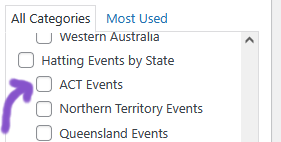
If you are posting an event – select your state under “Hatting Events by State“. You will need to scroll down the list to find it.
Eg if you are in ACT then you would select “ACT Events“
If your event is in a border town, or it will travel from one state to another, feel free to select any additional relevant states.

If you are posting your contact details, chapter lists or for anything else about your state that isn’t an event notice, select your state under “Hatting by State“.
#4 – Publish
Once everything is filled out, double check it’s correct then click the “Publish” button to put your post up on the website.
After you have Published, this will become an “Update” button, and you can use that if you need to make any edits.
Step #5 – Look at the website and check your post looks like you want it to!
Optional – Featured Image

There is an option for a “Featured Image” – this puts a picture at the top of your post and this will show on the pages that display all the posts.
To add an image, click the “Set featured image” link, then “Upload files” and upload the image from the files on your device.
This is recommended when doing an event listing, so you can insert an image of the event flyer to help the event stand out in the event listing on the main event page.
This shows what the Events page looks like with the events that have featured images, and those (at the bottom) that do not.

Optional – Post Display Order
By default the posts are set to display with the newest one showing first. In the case of event notices, this may mean that events scheduled for a year or more in advance are showing before events that are happening soon.
This can make it confusing for Hatters viewing the event listings, and may mean they miss out on an event because they weren’t aware it was on.

To solve this, you can use the “quick edit” option in the posts list.

By changing the date here (which is the date you made the post), you can make the post “newer” or “older”, changing its position in the event listings, to keep your events in chronological order.
For example, if I posted an event in April 2025 that is for March 2026, I can just “quick edit” the post and set the date to being one day later than the January 2025 post date of the event before it.

Changing the date of my “Girls Getaway” to 15th April 2025 (and refreshing the page) will make it move down the list to show the event post chronologically with the other events.

If you have listed several events on the same day, you can edit the time of day they were posted to, instead of the day/month to adjust the sorting order of the posts.


